
Advanced Techniques for Optimizing Kubernetes Spend with Convox
Rightsizing Your Cloud Resources
How Fly.io bills compute, storage, networking, managed services, reservations, and autoscaling in 2026.

This article explains Fly.io’s 2026 pricing, including its current free trial, legacy allowances, regional Machine pricing, storage charges, managed services, and automatic scaling costs.
Fly.io replaced its legacy plans with Pay As You Go pricing on October 7, 2024. The change moved Fly.io closer to a serverless-style usage model, although some services still use fixed monthly pricing or optional subscriptions. See also our Fly.io listing.
Platform as a Service (PaaS) and Serverless are typically seen as different approaches to cloud application development, but as the industry evolves, the lines are getting blurred. Serverless is often reduced to just Functions as a Service (FaaS), but it’s much more than that. AWS Serverless Hero Ben Kehoe defines Serverless as a spectrum - a perspective we share at srvrlss.io. In our vision, Serverless is becoming the paradigm for modern cloud-native development, in contrast to traditional monolithic architectures.
Like so many things in life, serverless is not an all-or-nothing proposition. It's a spectrum - and more than that, it has multiple dimensions along which the degree of serverlessness can vary.
While there is still some debate about whether, or to what degree, PaaS can be classified as Serverless, the Pay As You Go model fits the mold of Serverless. This model allows for automatic scaling and more granular billing based on actual resource usage - key traits of Serverless computing.
That does not mean Fly.io is a pure scale-to-zero platform where all costs disappear when traffic stops. Stopped Machines can still incur root filesystem charges, persistent volumes continue billing, and managed services can add fixed monthly costs.
For now, let’s look at what Fly.io’s previous model was like and what you can expect in 2026.
Fly.io previously offered mixed billing plans that combined a flat subscription fee with additional charges for resources, while features and support levels were tied to specific tiers. This included a one-time $5 trial credit for users signing up for the paid Hobby plan and recurring free resource allowances for eligible legacy organizations.
Those legacy allowances currently include:
shared-cpu-1x Machines with 256 MB RAMBeyond the free allowance, users are billed for what they use each month.
Fly.io is still honoring eligible legacy plans and free allowances for organizations that had them before October 7, 2024.
The previous plan structure used these tiers:
Fly.io no longer offers plans to new customers. New organizations use Pay As You Go billing instead.
Fly.io is still honoring eligible legacy plans and allowances. Organizations that purchased Launch or Scale before October 7, 2024 can remain on those plans unless they switch to Pay As You Go, delete their payment method, or otherwise stop using Fly.io.
Legacy Hobby organizations also remain supported. However, once an organization switches to Pay As You Go, the old plan cannot be restored.
The legacy plans could get complicated, so Fly chose a more serverless-like, usage-based pricing model. Billing is monthly per organization and applies to all new organizations, including organizations created by existing users.
The important nuance is that billing is based on provisioned resources as well as runtime. A running Machine is billed per second, but volumes, snapshots, IP addresses, certificates, managed databases, support, and some third-party services use separate meters.
For more details, refer to Fly.io’s billing documentation and resource pricing page.
Fly.io now offers a limited free trial. There is still no ongoing free tier for new Pay As You Go organizations.
The current trial includes:
Trial Machines automatically stop after running for 5 minutes. Dedicated IPv4 addresses, performance CPUs, and GPU Machines are not included. Adding a payment card ends the trial and starts normal billing.
See Fly.io’s free trial documentation for the latest limits.
In true Serverless fashion, Fly.io offers autostop and autostart features that allow applications to reduce running compute during low-traffic periods. Here’s how it works:
Monitoring: Fly Proxy evaluates incoming requests and configured concurrency to determine whether existing Machines have excess capacity.
Autostop: When demand decreases, Fly Proxy can stop or suspend existing Machines. CPU and RAM charges stop, but stopped and suspended Machines are still billed for root filesystem usage at $0.15 per GB per month.
Autostart: When demand increases, Fly Proxy starts existing stopped or suspended Machines. It does not create new Machines.
Minimum Machines Running: You can specify a minimum number of Machines to keep running in the primary region, ensuring that your application remains responsive during low traffic.
Fly.io also offers separate metrics-based autoscaling. That autoscaler can create and destroy Machines based on a metric such as queue depth or pending work.
The phased regional pricing rollout described in the original 2024 article has finished. Fly.io now publishes current Machine prices for each region directly in its pricing matrix.
The cost of running a Fly Machine is determined by its CPU/RAM preset, additional RAM, and region. The same shared-cpu-1x configuration can therefore cost materially more in one region than another.
As of July 28, 2026, the lowest listed monthly price for a continuously running shared-cpu-1x Machine ranges from $1.94 with 256 MB RAM to $10.70 with 2 GB RAM. The highest listed regional prices for the same configurations range from $3.14 to $17.28.
The following chart compares those current lowest and highest listed regional prices. It covers running compute only, not storage, network traffic, managed services, or stopped Machine root filesystem charges.
Fly.io shared-cpu-1x monthly regional price range, verified July 28, 2026
Yes. Fly.io’s core compute model is Pay As You Go, but several services and add-ons use fixed monthly pricing or annual commitments.
Fly.io offers Upstash Redis on a Pay As You Go plan starting at $0.20 per 100,000 requests. Fixed-price plans are also available for workloads that need predictable capacity or use aggressively polling queues.
The fixed plans currently start at $10 per month for 250 MB, with additional charges for read regions.
Fly.io Managed Postgres uses fixed monthly plans plus provisioned storage. Current plans start at $38 per month, and storage costs $0.28 per provisioned GB for a 30-day month.
These plans include high availability, backups, and connection pooling. Managed Postgres lives outside your Fly Apps, so deleting an app does not delete its database.
You’ll receive a 40% discount when you reserve a block of compute time for either performance Machines or shared Machines in a specific region. Reservations apply to eligible CPU and additional RAM usage for the selected CPU class and region.
The annual amount is paid upfront. Monthly credits do not roll over, so reservations only make sense for predictable baseline usage.
Unlike the legacy plans, which tied support levels to specific tiers, Fly.io now provides Community support to all customers. Paid support packages are available separately:
Fly Kubernetes also adds a $75 monthly fee per cluster, plus the cost of its Machines and volumes.
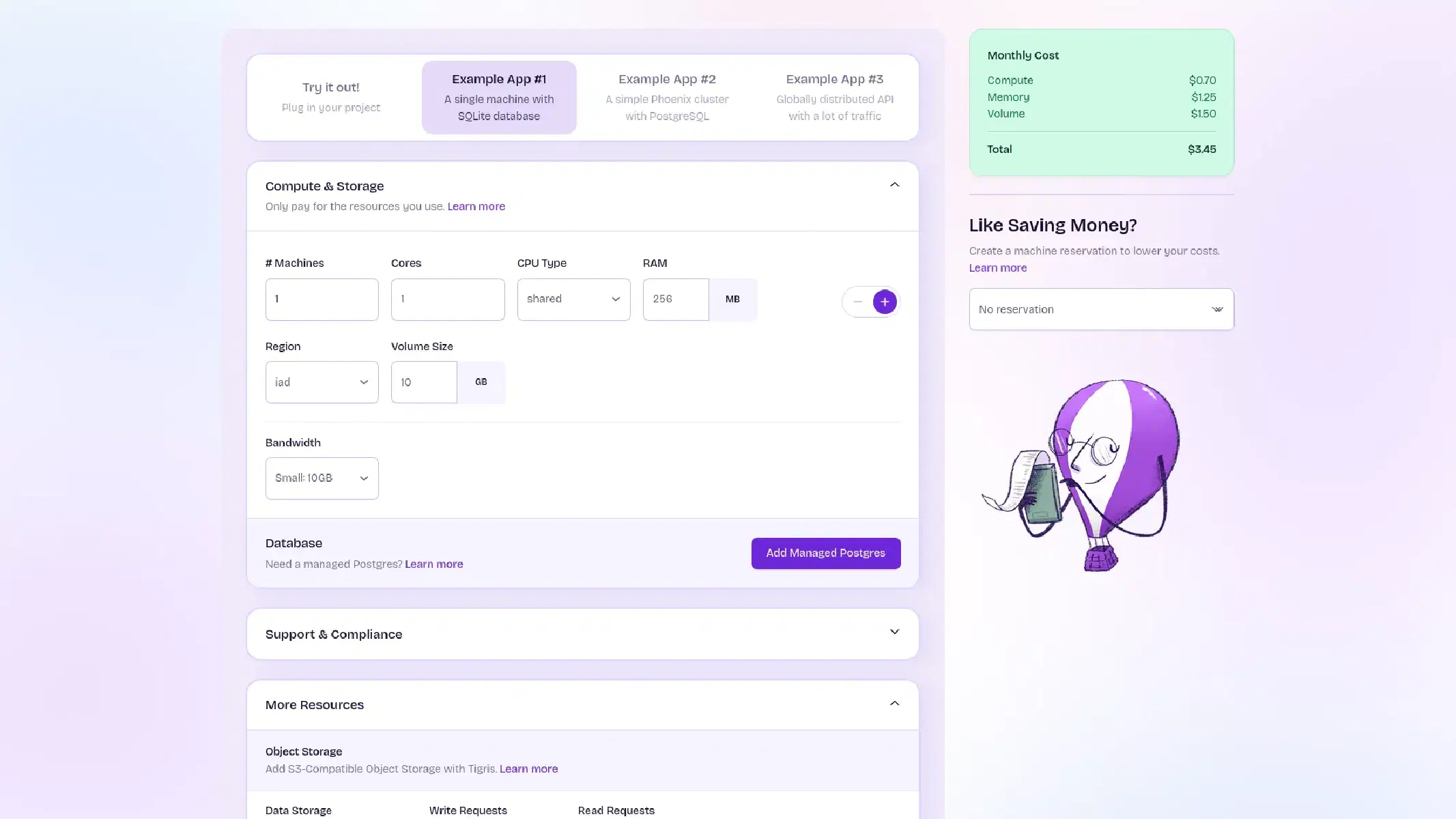
While Fly.io aimed to simplify its pricing structure, determining your total cost can still be tricky. The headline Machine price does not include every possible charge, and scaling to zero does not necessarily reduce the entire bill to zero.
For a realistic estimate, include:
You can get an indication of what to expect with the Fly.io Pricing Calculator. After deployment, compare the estimate with actual usage in the Fly.io dashboard.
With Fly.io’s Pay As You Go pricing model, it’s crucial to weigh both the benefits and drawbacks.
Cost Efficiency: You pay for started Machine compute per second, which can lead to savings for applications with fluctuating traffic.
Automatic Scaling: Existing Machines can automatically stop or suspend during low traffic and start again when demand returns.
Granular Configuration: Compute, memory, storage, regions, networking, and managed services can be selected independently.
Reservation Discounts: Predictable compute workloads can receive a 40% discount through annual reservation blocks.
Potential for Increased Costs: Consistently high traffic, extra memory, volumes, databases, and network transfer can make the total bill rise quickly.
Multiple Cost Meters: Machine runtime, stopped root filesystems, volumes, snapshots, networking, managed services, and support are billed separately.
Scale to Zero Is Not Zero Cost: Persistent storage and some managed services continue billing when application compute stops.
Limited Free Trial: New users receive 2 VM hours or 7 days, whichever comes first, but no persistent free tier.
Fly.io’s pricing model can offer flexibility and efficiency. But while the Pay As You Go approach is appealing for its cost-saving potential, it may not be the best choice for everyone - especially for applications with constantly running compute, persistent storage, managed databases, or heavy cross-region traffic.
I do want to comment again on Fly.io’s commitment to honoring legacy plans for eligible users who signed up before the changes. This respect for existing users is increasingly uncommon. However, should you choose to switch to the new model, remember that you cannot return to the legacy plan and that you will need to actively manage usage to avoid unwelcome surprises in your bill.
Hopefully, shedding some light on these nuances of Fly.io’s pricing will help you make informed decisions for your next projects.

Willem is a web developer passionate about design, development, and deployment.
With over 15 years of experience in systems, automation, and product design, he focuses on building tools that make the web faster and more efficient, combining creativity with technical precision.
He loves the process of creation and to keep learning every day.
Rightsizing Your Cloud Resources

What I learned deploying PostgreSQL databases, Django apps, and n8n on both platforms

Plus 3 alternative back-end development tools

+ 3 alternative serverless security tools